

Some of you lovely people have asked how to download files from Flickr (where, incidentally many of my as-yet-unblogged paper sets are hiding themselves away as they await their own blog posts). So, I thought I'd share a tutorial showing the details of how to download from Flickr.

The following pictorial is sure to work for PC users,
but hopefully Mac users can download this way too.
but hopefully Mac users can download this way too.


-1-

You can find my Flickr gallery here.
(It's a mix of all my blog photos, like the ones used in this tutorial,
as well as card photos, free papers and overlays, templates, etc).
-2-

papers & overlays from Flickr:
Step 1) Go to Flickr. You can see all of my sets in one spot here:

Step 2) Click on the image of the set that you'd like to look at,
it will open up a page that looks something like this:
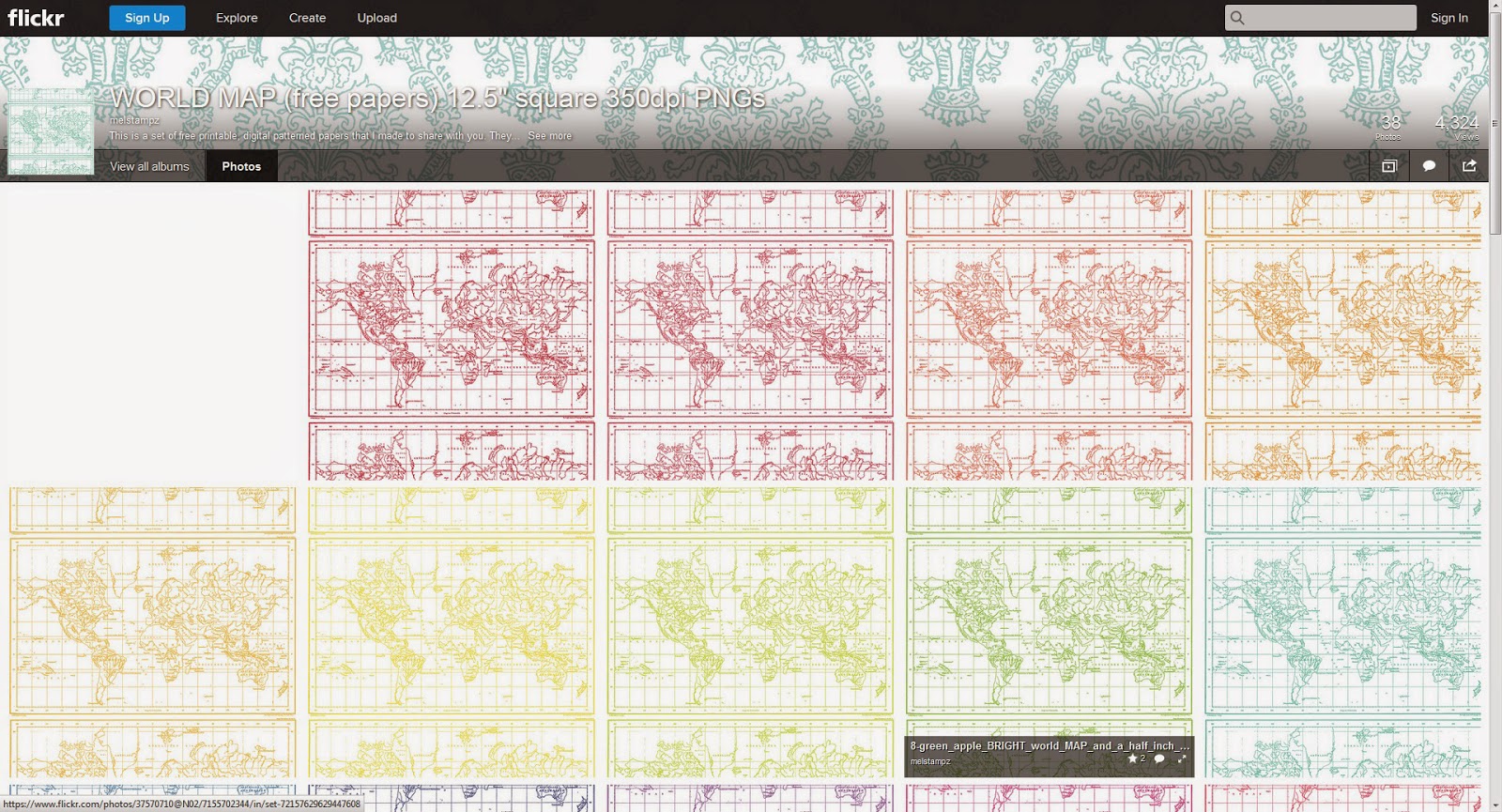
Step 3) Click on the thumbnail of the colour you want (or the overlay) and it will
take you to the page for that particular image. You can then do one of two things:
1) Add it to your flickr favorites (if you have a Flickr account.The basic account is free). This option is nice, since there is no need to take up space on your computer by downloading.
or 2) you can save the file to your computer, if you like, this way:

Step 4) To easily save a file on Flickr, click on the arrow symbol at the bottom right-hand side
and select 'original' for the best quality (or choose whichever size you prefer):

Step 5) Once you click 'original', simply select 'save file' and then hit 'okay'.

And that's it!
(It takes about 30 seconds) :-)
Not familiar with flickr? Here's a little bit of
rambling info based on my experience with it...
-3-

Why use flickr?
Did you know that Blogger converts & reduces images to 72dpi? This usually doesn't matter for viewing on the computer, but it makes for horrible printing if you're sharing free digital images or papers. So, to get around Blogger's lower quality images, I pay for a pro account on Flickr and host my printable freebies there where they images can remain at 350dpi for great print quality.
What is flickr?
Flickr is an image hosting site where people upload their private photos or images they want to share. There are some lovely people with flickr galleries that have share alike settings or other settings
that allow you to use their images for different things.
that allow you to use their images for different things.
What do those settings mean?
Each photo has a license setting.
You might see "all rights reserved" on an image;
that means it's one that we shouldn't save or use in any way.

But some images have a creative commons license - which means you are allowed to use the image (sometimes with exceptions). You can read all about the various types of licenses here, if you like:
http://www.flickr.com/creativecommons They'll let you know what uses different flickr members
have allowed (or not allowed) with their images. :-)
How do I find things on flickr?
Try searching on flickr using the keyword free... with any of these keywords: digital image, collage sheet; printable; paper; free vintage images; template; pattern; and so forth.
I hope this has been helpful to those who want to download
from flickr, and if you have any questions at all, please fire away!
from flickr, and if you have any questions at all, please fire away!




20 comments:
Thanks so much Mel. Will definitely try out.
Mel, I'm a computer idiot and your instructional posts are so helpful to me. I can't thank you enough! Holly M.
You are so sweet with your instructions . . . and extra sweet sharing these wonderful papers. I have already downloaded some, but I must USE them now.
Thanks for explaining, Mel.
Wow! I didn't realise you had such a wee treasure trove hidden away in flickr... I'm off to look now for some images to print onto fabric
Thanks for sharing your work!
thanks for the great tips! I'd have never thought to use Flickr like that!
thanks babe!
You consistently amaze me with your complete and total generous spirit. I've learned so much from your blog and absolutely love your free downloads. Thank you so much for sharing all that you do!
Thanks for your instructional Mel. Its very help me.
thank you for the simple explanation!! i've been trying to figure it out on my own, quite awhile.. emphasis on trying! hehe now i can feel like christmas all over & go back to the ones i've wanted! oxox have an awesome week!
Thank you so much for your instructions Mel and for sharing so much with your readers ;-)
I always learn so much from you!!
Greetings from Chicago~
Thanks for this Mel. I've downloaded before from Flickr but its been a bit hit and miss and this step by step guide was really helpful. And I didn't realise you had so many different papers there so I shall be having a good browse round now. You are so generous with your freebies. thanks again, Margie x
Wow, you have such a great collection of papers. I love that card you made below. You should do a tutorial on how you did that stippling technique with the copics. It is gorgeous.
And thanks foe stopping by my blog and leaving me a comment. :)
Thank you for a good explanation on saving freebies from Flickr. I had no idea how you went about it. Thank you for all of the wonderful free graphics you share.
Thanks so much for your sweet generosity for all of us folks who don't have a clue or the talent! (ME)... :)
I am in LOVE with Chevrons, Hexagons and all the patterns (like everyone else)...and love, love, love all the colors. I'm so sorry to hear about your injury...take good care of that!
I have one as well...hard to sit at the computer for too, too long...was wondering...if I didn't see or are any of your files in a zip file all together...? Thanks again so much for sharing and all your hard work.
Take good care of yourself.
Kathi
Just wanted to say thanks so much for your generosity, and all the fabulous papers!! I hope you don't me putting a link to you on my blog (and there is a card I made today using your chevron paper... http://diningroomdrawers.blogspot.co.uk/2013/02/sizzix-pop-n-cuts-boys-birthday-card.html
Thanks again,
Helen x
Just wanted to add my thanks for sharing your free papers. I haven't scrapbooked for a really long time because of the cost of the digital files, so this will allow me to get back into it. Your papers are beautiful!
I right clicked every picture in sight and it will not give me that list. Why does the right click not work?
This is incredible. I am just getting started digital scrapbooking and have a very small collection of papers ... this is going to make everything a hundred times better. Thank you so much!
I have just discovered your lovely papers Mel and I am so excited. Can I access them through my IPad.
Post a Comment